


Tropical Hurricane Tracker
4.91.33K Reviews
App Specs
- Version
- 5.1.6
- Updated On
- License
- Free
- Downloads
- 500,000+
- Developer
- JPL Technical Solutions
- Categories
- Weather
- Platform
- Android
Screenshots
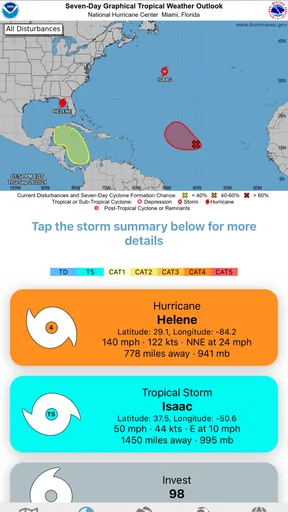
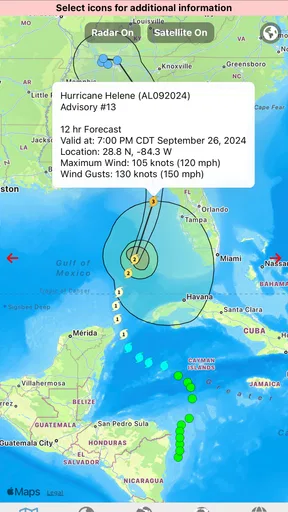
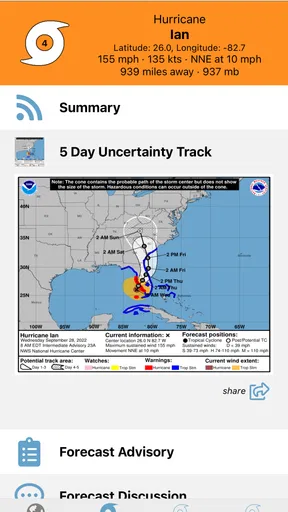
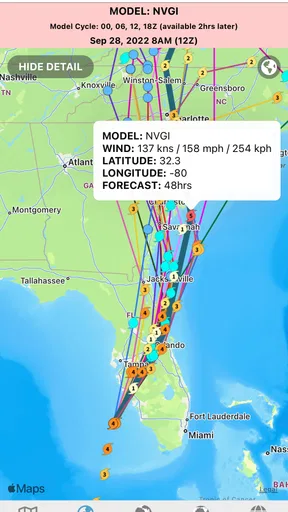
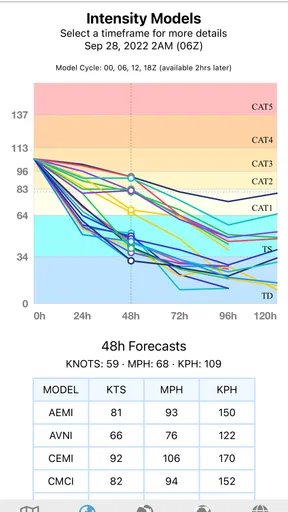
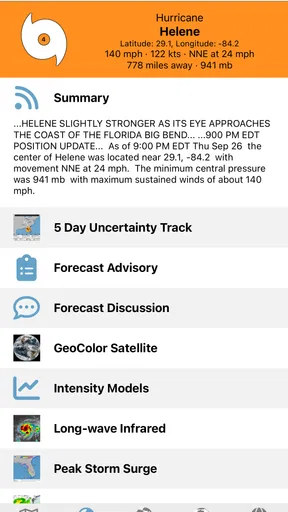
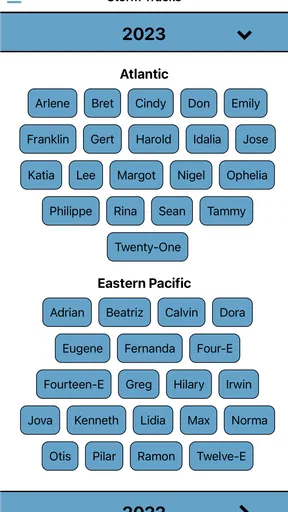
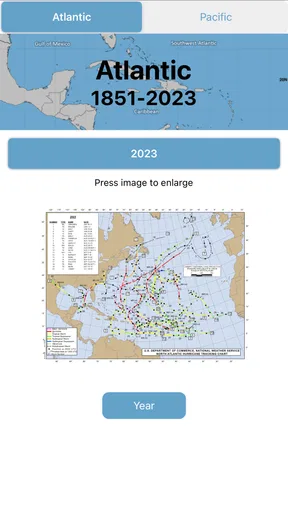
 Analysis by AppCompare
When a tropical system starts drawing attention, I want a clear way to follow it without turning a quick check into an hour of searching. Tropical Hurricane Tracker is a weather app from JPL Technical Solutions built around cyclone activity. Its focus is narrower than a general forecast app, which can be useful when storms are the reason you opened your phone in the first place.
What a focused tracker is good for
I find a dedicated storm tracker most useful as a second screen for context, not as a substitute for official emergency instructions. It can help me keep an eye on a system while I’m deciding whether to change a trip, check on family, or follow developments near a coastline. The practical question is not simply where a storm is now, but whether its movement gives me a reason to look for a more local forecast or an official alert.
That distinction matters because tropical systems can affect places far beyond the point shown on a map, and conditions can change. I’d use the app to follow the broad picture, then check local authorities and trusted weather services before making safety decisions. A tracker can make monitoring easier; it cannot make a storm predictable or replace preparation.
Speed expectations and busy moments
Storm information is most valuable when I can get to it quickly. A focused app has a natural advantage over a general weather screen when I’m looking specifically for cyclone activity: I don’t have to mentally sift through unrelated everyday forecast details before getting to the subject I care about. That is a workflow advantage, rather than a promise that every update will arrive instantly or that the app will feel equally quick on every device and network.
During a developing event, I’d expect to check repeatedly, compare what I’m seeing with local information, and perhaps revisit the same storm later in the day. That kind of heavier use is also when I’d pay attention to whether the information is current, whether the display is easy to interpret, and whether the app returns smoothly after I switch to another source. I would not treat a busy-looking map as proof that a forecast is more certain.
A useful habit is to separate monitoring from decision-making. I might open the tracker to understand the storm’s broader situation, then use an authoritative local source for evacuation notices, road closures, or instructions that apply to my address. This two-step routine keeps the app in a sensible role: helpful for awareness, while the decisions that carry real consequences rely on the people responsible for local safety guidance.
Reliability, limits, and everyday use
For an app in this category, reliability means more than launching without trouble. I want the information to remain understandable when I return later, and I want to avoid assuming that a displayed position or path is a guarantee of what will happen. Tropical weather is uncertain by nature, so I’d read a tracker as a way to follow activity rather than as a precise promise about a particular street or hour.
Worth Reading Before You Choose

EA SPORTS FC Mobile 26 Is a Bigger Football Game, but It Takes Time

Flipboard Shows What News Apps Must Do Beyond the Feed

Switching to Android Auto Means Rethinking Your Driving Routine

Google Calendar Makes a Crowded Week Easier to Manage

Ludo King Makes the Most of the Minutes Between Plans

Baby Panda World Brings Quick Play to Modern Phones, but Its Game Library Feels Busy
That makes the app a better fit for weather enthusiasts, coastal residents who want a dedicated place to monitor cyclone activity, and travelers who are checking conditions before or during a trip. It is less suited to someone who only wants a simple daily temperature and rain forecast; a conventional weather app will usually be more direct for that routine. If I were already relying on official channels for an active emergency, I’d keep those open rather than depending on a single tracker.
There is also a practical trade-off in choosing a specialist tool. Its subject is useful when storms matter, but it may not replace the broader forecasts, radar, or local alerts people expect from an all-purpose weather service. I’d keep it for the moments when tropical activity deserves focused attention, rather than expecting one app to handle every weather question.
Device fit and getting value from it
The app is free to install and is rated for Everyone. It has an average rating of 4.9 from around 12,000 ratings, with about 1,300 written reviews, and has passed 500,000 installs. The current version is 4.3.20, and it supports devices running version 7.1 or later. Optional in-app purchases range from $1.99 to $6.99 per item, so I’d check what an item offers before paying rather than assuming the core experience requires a purchase.
Those details help set expectations, but they don’t tell me how quickly it will run on a particular phone or how much power it will use during a long monitoring session. I wouldn’t claim it is lightweight or battery-friendly without a basis for that. On an older or storage-constrained device, the sensible approach is to install it when needed, keep the operating system within its supported range, and judge performance during ordinary use instead of relying on a blanket promise.
For a trip, I’d check the tracker before leaving, note which local sources I’ll use if conditions change, and avoid waiting until connectivity is poor to look for essential guidance. That is a useful workflow for any storm-monitoring app: the tracker can help me stay oriented, while preparation means knowing where to turn if the situation becomes urgent.
How it compares with everyday weather apps
A standard weather app is usually the quicker choice when I want today’s forecast for one location, such as whether to carry an umbrella or plan an outdoor errand. Tropical Hurricane Tracker makes more sense when the question is specifically about cyclone activity. It is a specialist companion, not automatically a replacement for forecasts that cover hourly conditions, local warnings, or routine weather across several places.
That specialization also creates a useful boundary: I wouldn’t install it expecting a complete travel-planning toolkit, nor would I rely on a storm overview to answer whether a particular road is safe. If those are my main needs, a local forecast service or official emergency channel is the better tool. If following tropical systems is a recurring interest, keeping a focused tracker alongside those sources can reduce the friction of finding storm-specific context.
What I would check before relying on it
One question people often have is whether a tracker alone is enough during an approaching storm. My answer is no: I’d use it for awareness, then confirm warnings and instructions through official local channels. Another is whether it makes sense outside storm season. If I rarely follow tropical systems, a general weather app may be all I need; the specialist focus earns its place when cyclone activity is relevant to my home, travel, or interests.
I’d also ask whether I need to pay to start using it. It is free to install, while optional purchases are available; before buying, I’d look at the particular item and decide whether it solves a need I actually have. And if the app seems slow or hard to interpret on my phone, I’d check my connection and compare with another trusted source rather than treating a delay or confusing display as a reliable signal about the weather itself.
Why You Need This in Your Pocket
Picture this: you're planning a beach getaway, and suddenly, there's chatter about a storm brewing offshore. The Tropical Hurricane Tracker becomes your go-to buddy. It's like having a meteorologist in your pocket, ready to give you the lowdown on what's happening out there in the ocean.
Features That Make a Splash
What really got me hooked on this app is its real-time updates. You get up-to-the-minute info on storm paths, wind speeds, and potential landfall locations. It's like having a front-row seat to Mother Nature's show, but without the soggy popcorn.
Another cool feature is the interactive map. You can zoom in and out, swipe around, and basically play meteorologist. It’s surprisingly fun, and dare I say, a bit addictive. Plus, the app sends you alerts if a storm is heading your way, so you won’t be caught off guard while enjoying your morning coffee.
User Experience and Design
The design is clean and intuitive. Even if technology isn't your thing, you'll find the navigation a breeze. The interface is user-friendly, with clear icons and straightforward menus. It's like the app is speaking your language, keeping things simple and straightforward.
Now, I know what you're thinking: "Do I need another app cluttering my phone?" Trust me, this one's worth the space. The developers have done a fantastic job of making it lightweight, so it won’t hog your memory or battery life.
Keeping It Real with the Community
One of the standout elements of this app is its community feature. Users can report on-the-ground conditions, and you can see what's happening in real-time through other users' eyes. It’s like having a network of storm chasers at your fingertips, giving you the scoop from the field.
And if you’re a bit of a data geek, you'll love the detailed storm history it offers. You can look back at past hurricanes and see how they panned out, which is super handy for drawing comparisons with current events.
Final Thoughts
Wrapping it up, the Tropical Hurricane Tracker is more than just an app; it’s a trusty sidekick in stormy weather. It brings together real-time data, a vibrant community, and a simple interface to keep you informed and prepared. Whether you're a weather enthusiast or just someone who wants to stay safe, this app is a must-have.
So, before the next storm rolls in, why not give it a try? It’s like having a crystal ball for weather, minus the hocus pocus. Stay safe, stay informed, and let this app be your guide when the winds start howling.
Pros
- Accurate real-time storm tracking updates.
- User-friendly interface for easy navigation.
- Customizable alerts for specific regions.
- Detailed maps with multiple viewing options.
- No subscription required for basic features.
Cons
- Limited offline functionality.
- Ads can be intrusive at times.
- Some features require in-app purchases.
- Occasional delays in data updates.
- Limited support for older devices.
FAQs for Tropical Hurricane Tracker
What features does the Tropical Hurricane Tracker offer?
The Tropical Hurricane Tracker provides real-time updates and alerts about tropical storms and hurricanes. It includes detailed maps, storm trajectories, and forecast models. Users can customize alerts for specific locations and access historical data to understand storm patterns. Additionally, the app offers expert insights and safety tips to help users stay prepared.
Is the Tropical Hurricane Tracker app free to use?
The app offers a free version with basic features, including storm tracking and alerts. However, for advanced features like detailed forecast models and expert analysis, there is a premium subscription option. This allows users to access more in-depth information and personalized notifications, beneficial for those in hurricane-prone areas.
How accurate is the information provided by the app?
The Tropical Hurricane Tracker utilizes data from reputable meteorological organizations, ensuring high accuracy. The app updates in real-time, reflecting the latest forecasts and storm developments. While no app can guarantee 100% accuracy due to the unpredictable nature of weather, it provides reliable insights to help users make informed decisions.
Can I track multiple locations with the Tropical Hurricane Tracker?
Yes, the app allows you to monitor weather conditions in multiple locations. You can set up alerts for different regions, making it ideal for users with family or property in various areas. This feature ensures you receive timely notifications, regardless of where you or your loved ones are located.
Is the app available for both Android and iOS devices?
Absolutely, the Tropical Hurricane Tracker is available for both Android and iOS platforms. Users can download it from the Google Play Store or the Apple App Store. It is designed to be user-friendly on both operating systems, ensuring seamless navigation and access to all features, regardless of your device.


